Free tool in SAK
Simple expense tracker
Know where your money goes without spreadsheets or bank logins. Add an expense in two taps and see your monthly total and category breakdown instantly.
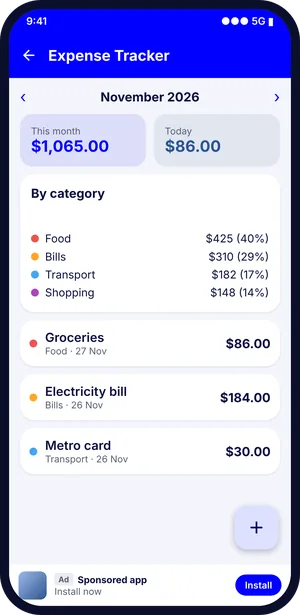
What you can do with the Expense Tracker
Add in seconds
Enter an amount, choose a category and add an optional note.
Monthly overview
This month's total and today's spending at a glance.
Category breakdown
See where your money goes: Food, Bills, Transport, Shopping and more.
Your currency
Choose your currency symbol in Settings.
Private
No bank connection and no account. Your spending stays on your phone.
How to use it
- Open Expense Tracker and tap +.
- Enter the amount, choose a category and add a note if you like.
- Check your monthly total and category breakdown.
Expense Tracker: common questions
Does it connect to my bank?
No. SAK never asks for bank details. You add expenses yourself, which keeps everything private.
Can I see past months?
Yes. Use the arrows at the top to move between months.
Works great with

Get every tool and AI agent in one free Android app.
Free to download. No account needed. Most features work offline.
Download SAK on Google Play