AI agent in SAK
AI Notes Assistant: notes that work for you
SAK's Notes Assistant reads your notes so you don't have to. Pick a note or paste any text, and it can summarise it, pull out the action items, suggest a title and tags, clean up the writing, or answer a question using everything you've saved.
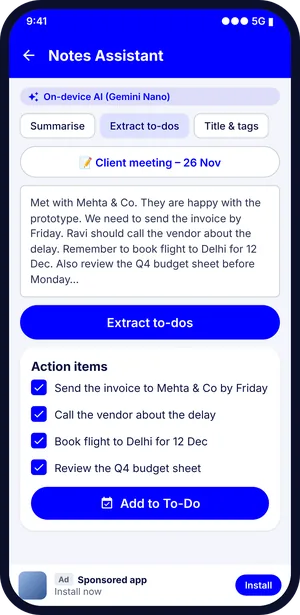
What you can do with the Notes Assistant
Summarise
Get the key points of a long note in three short bullets.
Extract to-dos
Action items are pulled out automatically and added to your To-Do List with one tap, with due dates where they're mentioned.
Title and tags
Get a short title and three tags for any note, and apply them in one tap.
Clean up
Fix spelling, grammar and formatting while keeping your meaning.
Ask my notes
Ask "What's the office Wi-Fi password?" and SAK finds the answer in your notes.
How to use it
- Open SAK and tap Notes Assistant.
- Choose an action, such as Summarise or Extract to-dos.
- Pick a note or paste text, tap the button, then save the result or add the to-dos to your list.
Example
Meeting notes that say "We need to send the invoice by Friday. Ravi should call the vendor." become two tasks: "Send the invoice by Friday" and "Call the vendor".
Notes Assistant: common questions
Does it work with notes from other apps?
Yes. Paste any text into the Notes Assistant, or copy notes into SAK's Notepad first.
Are my notes uploaded anywhere?
No. Your notes are stored only on your phone, and the assistant processes them on your phone.
Can it find a note if I don't remember the words?
Ask my notes matches related words and phrases, so you can ask a question naturally instead of searching for exact words.
Works great with

Get every tool and AI agent in one free Android app.
Free to download. No account needed. Most features work offline.
Download SAK on Google Play