AI agent in SAK
AI Task Manager: just say it, SAK schedules it
SAK's Task Manager is a free AI agent for Android that turns everyday language into organised tasks. Type or say "Pay rent every 5th" or "Call mom tomorrow at 7pm", and it creates the task, sets the due date and reminds you on time.
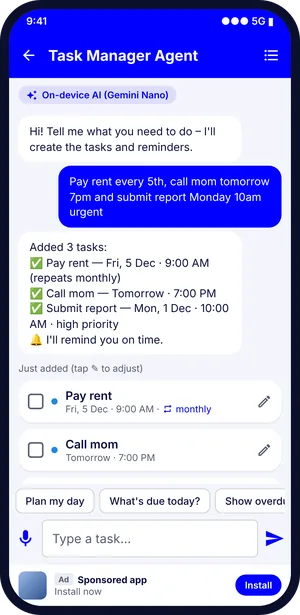
What you can do with the Task Manager
Understands plain English
Dates like "tomorrow", "next Friday", "on the 15th" or "in 2 hours", and times like "7pm" or "noon", are understood automatically.
Voice input
Tap the microphone and speak your task. It's perfect when you're walking, driving or cooking.
Several tasks at once
Say "Call mom tomorrow 7pm and buy milk tonight" and SAK creates two separate tasks.
Repeating tasks
"Every day", "every Monday" or "every 5th of the month" become repeating tasks that move forward when you complete them.
Priorities
Words like "urgent" or "important" mark a task as high priority, so it appears first.
Plan my day
Ask "Plan my day" for a suggested schedule that puts overdue and high-priority tasks first and fits them around your events.
How to use it
- Open SAK and tap Task Manager.
- Type or speak what you need to do, for example "Submit the report on Monday at 10am, urgent".
- Check the tasks SAK created and tap the pencil to adjust any detail. A reminder is already set.
Example
"Pay rent every 5th, call mom tomorrow 7pm and submit report Monday 10am urgent" creates three tasks: a monthly rent reminder, a one-off call reminder for tomorrow evening, and a high-priority report task for Monday morning.
Task Manager: common questions
Does the AI Task Manager need internet?
No. It works offline. On supported phones it uses Google's on-device Gemini Nano model; on other phones it uses SAK's built-in offline engine.
Will I get reminders if the app is closed?
Yes. Reminders are scheduled with Android's alarm system, so they arrive even when SAK is closed, and they are restored after your phone restarts.
Can I ask what is due today?
Yes. Ask "What's due today?", "Show overdue" or "Reschedule overdue" and the agent answers or updates your tasks for you.
Works great with

Get every tool and AI agent in one free Android app.
Free to download. No account needed. Most features work offline.
Download SAK on Google Play