Free Android app
An army of AI agents and useful tools for your day-to-day life
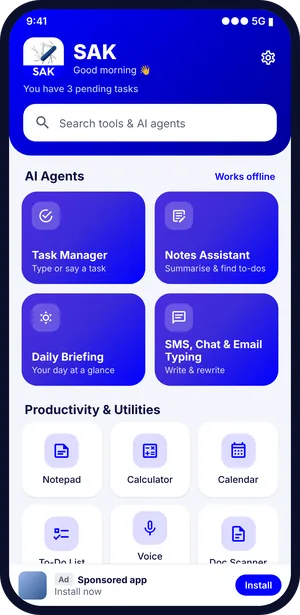
SAK is a free Android app with AI agents and everyday tools: turn plain English into reminders, write better messages, scan, convert and track, all in one app.
- No account or sign-up
- Works offline
- Your data stays on your phone
SAK at a glance
- What it is
- An all-in-one Android app with built-in AI agents and everyday tools
- AI agents
- Task Manager, SMS, Chat & Email Typing, Daily Briefing, Notes Assistant
- Tools
- Notes, calculator, calendar, to-do list, document scanner, QR scanner, compass, flashlight, unit converter, expense tracker, password vault and more
- Price
- Free (supported by ads), every feature included
- Platform
- Android 8.0 or later, on Google Play
- Privacy
- No account. Notes, tasks and passwords are stored only on your phone
- Developer
- UniverSL Software
AI agents that do the work for you
Type or speak in plain English. SAK's agents turn it into tasks, polished messages, tidy notes and a daily plan.
Task Manager
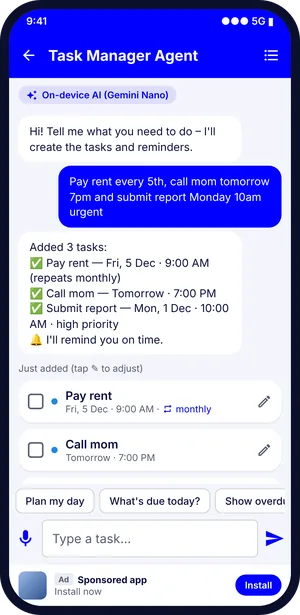
Just say it, and SAK schedules it. Type or speak a task in plain English, and the Task Manager works out the date, time, priority and repeat schedule, then reminds you on time.
- Understands plain English
- Voice input
- Several tasks at once
SMS, Chat & Email Typing
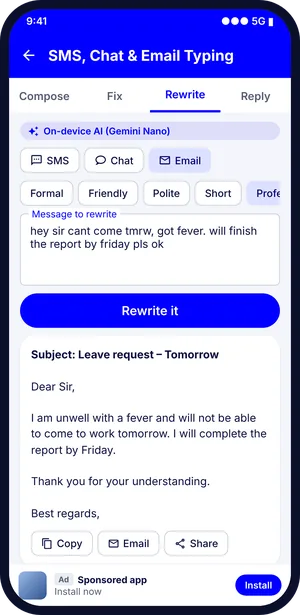
Write better texts, chats and emails in seconds. Fix spelling and grammar, rewrite a message in a different tone, translate it, or get quick reply ideas, then send it straight to SMS, WhatsApp or email.
- Compose from a short description
- Fix spelling and grammar
- Rewrite in five tones
Daily Briefing
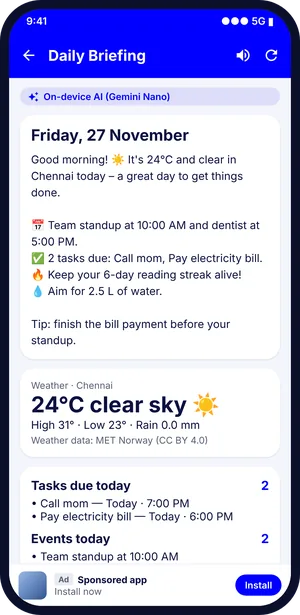
Start every day knowing exactly what's ahead. The Daily Briefing pulls together the weather, your events, tasks due, habits and spending into one friendly summary, which it can read aloud.
- Local weather
- Events and tasks
- Habits and health
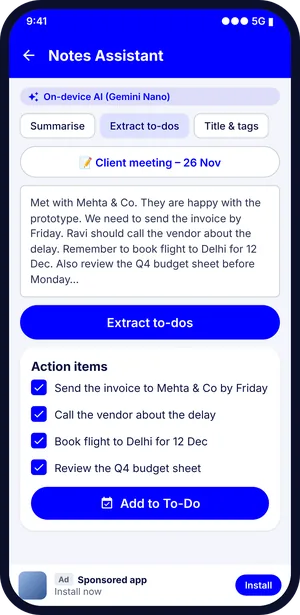
Notes Assistant
Notes that work for you. Summarise long notes, pull out action items and add them to your to-do list in one tap, get title and tag suggestions, or ask a question and find the answer in your notes.
- Summarise
- Extract to-dos
- Title and tags
Everyday tools, all in one place
Replace a phone full of single-purpose apps with one fast, lightweight app.
Productivity
Notepad
Notes, checklists, tags and pinned notes.
Learn moreCalculator
Standard and scientific calculator with history.
Learn moreCalendar
Month view with events, tasks and reminders.
Learn moreTo-Do List
Tasks with due dates, priorities and repeats.
Learn moreVoice Recorder
Record, play back and share voice memos.
Learn moreDocument Scanner
Scan documents to PDF with auto edge detection.
Learn moreUtilities
Compass
Accurate compass with a bubble level.
Learn moreFlashlight
Torch, SOS signal, strobe and screen light.
Learn moreUnit Converter
Length, weight, temperature, currency and more.
Learn moreQR & Barcode Scanner
Scan QR codes and barcodes, and create your own QR codes.
Learn moreClock: Alarm, Timer & Stopwatch
Alarms, stopwatch, countdown timer and world clock.
Learn moreRuler
On-screen ruler in centimetres and inches.
Learn moreMagnifier
Zoom in on small text with your camera.
Learn moreMoney & life
Expense Tracker
Track daily spending with category insights.
Learn moreTip & Bill Splitter
Work out tips and split bills between friends.
Learn moreLoan & EMI Calculator
Monthly loan payments, interest and schedule.
Learn moreHabit Tracker
Build daily habits and keep your streaks.
Learn moreHealth & security
Why people switch to SAK
Private by design
No account and no cloud sync. Your notes, tasks, expenses and passwords stay on your phone. The password vault is encrypted with your phone's secure hardware key.
Works offline
Tools and AI agents work without internet. Only weather and live currency rates need a connection.
One app instead of twenty
Save storage and home-screen space. Your tasks, notes, calendar and expenses work together, so the AI agents can help across all of them.
Get started in under a minute
- Install SAK from Google Play. It's free.
- Open it. There's no sign-up, so you go straight to your tools.
- Try an agent. Type "Call mom tomorrow at 7pm" into the Task Manager and watch the reminder appear.
Frequently asked questions
What is SAK?
SAK is a free Android app that combines AI agents (a Task Manager, a message and email writer, a Daily Briefing and a Notes Assistant) with everyday tools such as a notepad, calculator, calendar, document scanner, QR scanner, unit converter, expense tracker and password vault.
Is SAK free?
Yes. SAK is free to download and every feature is included. The app is supported by ads.
Do I need an account?
No. There's no sign-up or login. Open the app and start using it.
Does SAK work offline?
Yes. Almost everything, including the AI agents, works without internet. Only weather in the Daily Briefing and live currency rates need a connection.
Where is my data stored?
On your phone. Notes, tasks, events, expenses, habits and passwords are stored in SAK's private storage on your device and are not uploaded to any server.
How do SAK's AI agents work?
On supported phones, SAK uses Gemini Nano, Google's on-device AI model, so your text is processed on your phone. On other phones, SAK uses its own built-in offline engine that understands dates, times, priorities and repeating schedules, writes summaries and rewrites messages.

Get every tool and AI agent in one free Android app.
Free to download. No account needed. Most features work offline.
Download SAK on Google Play